Anki Setup Guide for Japanese Learners
Anki is a spaced repetition flashcard program that helps you remember vocabulary long-term. It's one of the most powerful tools available for language learning.
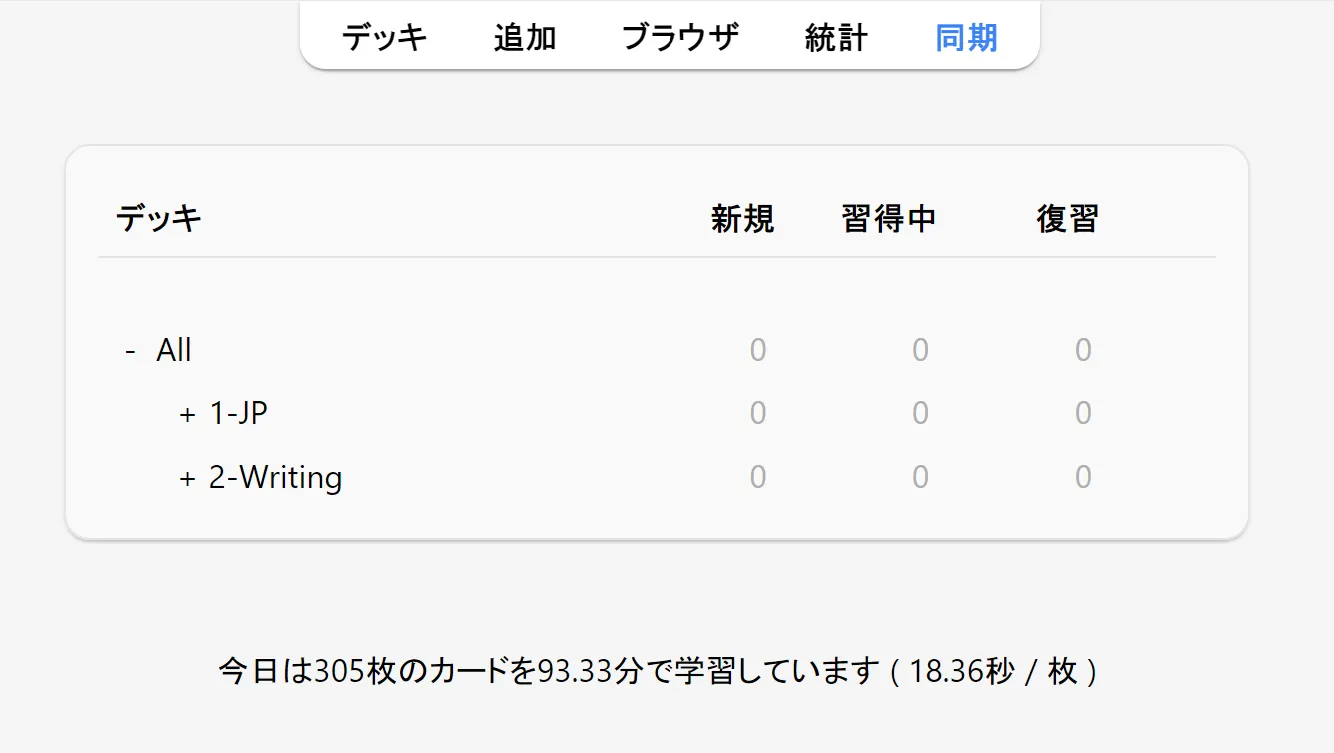
Important: Anki is designed for memory, not learning. You should encounter and understand words through reading VNs first, then use Anki to ensure you don't forget them. Don't try to learn entirely new concepts through Anki alone.
Installation
- Download Anki from the official website
- Choose the Qt6 version (recommended for better performance and add-on compatibility)
- Install and launch the application
- Create a free AnkiWeb account for syncing across devices
Tip: Sync regularly by pressing the sync button or using the keyboard shortcut. This backs up your progress and lets you review on mobile.
Core Concepts
Before getting started, make sure you understand these basic terms:
- Deck - A collection of cards (like a folder)
- Card - What you review (has a front and back)
- Note - The source data that creates cards (one note can make multiple cards)
- New cards - Cards you haven't seen yet
- Reviews - Cards you've seen before that are due for review
- Learning - Cards currently in the learning phase (not yet graduated)
Recommended Deck
For beginners, start with Kaishi 1.5k. It contains ~1500 of the most common Japanese words with example sentences, specifically designed for immersion learners.
To install:
- Download the
.apkgfile from the link above - Double-click it or use File → Import in Anki
- The deck will appear in your deck list
Alternative: Core 2k/6k Deck covers more words but Kaishi is more beginner-friendly with better example sentences.
Preferences
Before configuring deck options, check Tools → Preferences for global settings. For the most part, you don't have to change much here.
Review tab:
- Keep V3 Scheduler enabled
- Set Next day starts at to a time before you wake up (I use 4 AM)
- Increase Learn ahead limit to something high like 999 minutes to ensure all learning cards are seen within the day
- If you're distracted by card counts, disable "Show remaining card count" and "Show next review time" (though having them visible helps verify intervals aren't obviously wrong)
- Set answer keys to whatever you prefer
Appearance tab:
- Under User Interface, you can toggle dark/light mode and increase the UI size if needed
Deck Options
Access deck options by clicking the gear icon next to your deck, then selecting "Options."
Enable FSRS (Recommended)
FSRS is Anki's modern scheduling algorithm that's more accurate than the default. It solves the "ease hell" problem where cards can get stuck in frustrating review patterns.
- Go to Deck Options
- Scroll to the Advanced section
- Enable FSRS (this applies globally to all presets)
- Set Desired retention to 0.90 (90%)
- Click Optimize to let FSRS analyze your review history and tune itself to your memory patterns
Re-optimize periodically (monthly, or after building significant review history) to keep the algorithm tuned to your memory patterns. The parameters are preset-specific, so optimize each preset you use.
Desired retention controls what percentage of cards you'll recall correctly when they're due. Higher values mean shorter intervals and more daily reviews. Start with 0.90 and see how it feels. If the review load becomes too much, try lowering to 0.85. Stay between 0.85-0.95 for most learners. Going above 0.97 dramatically increases workload and defeats the purpose of spaced repetition.
Important: Only use Again and Good. Press "Again" when you forget, "Good" when you remember. Never press Hard when you forget a card. Hard is meant for "I got it but it was difficult," not for failures. Pressing Hard on forgotten cards causes the algorithm to assign unreasonably long intervals. The PassFail add-on (listed below) removes Hard and Easy buttons entirely to enforce this simple workflow.
Note: FSRS requires Anki 23.10 or later. Update if you don't see this option.
For more details, see the FSRS Tutorial.
Daily Limits
Under the Daily Limits section:
- New cards/day: Start with 10-15 (you can increase later once you're comfortable)
- Maximum reviews/day: Set to 9999 (effectively unlimited - never skip reviews)
Starting with too many new cards leads to overwhelming review piles later. Be conservative at first.
Learning Steps
Under the Learning section:
- Learning steps:
10mor15m(single step is simplest and works well) - Alternative:
1m 10mor10m 30mfor more exposure before graduation
A single learning step is often sufficient. FSRS handles scheduling well once cards graduate, so you don't need many learning repetitions. The key rule: all steps must be completable in a single study session. Avoid steps longer than 12 hours, and never use day-long steps like 1d.
Author's settings: I personally use a single
10mlearning step for new cards,3mfor relearning, and a leech threshold of 6.
Lapses
Under the Lapses section (for when you fail a card):
- Relearning steps:
10mor2m 1h - Leech action: Tag Only (don't suspend cards automatically)
Leeches are cards you repeatedly fail. Tagging them lets you review and possibly rewrite them later instead of having them disappear.
Rescheduling (Use Sparingly)
In the FSRS settings, you'll see a "Reschedule cards on change" option. You can run this occasionally (every few months) to let FSRS re-optimize your intervals based on your review history. However, doing this too often isn't recommended. Rescheduling can cause a large batch of cards to become due all at once as intervals get recalculated. Most people leave it off day-to-day and only reschedule when they want a fresh optimization.
Anki Philosophy
I find that a lot of people don't know how to do Anki. This might seem a bit odd, as the workflow, at first glance, seems extremely easy. A card is presented to you, you attempt to recall it, you then press a button depending on your evaluation of how well you remembered the content on the back of the card. It seems simple, but despite this, I constantly come across people who say that Anki just "doesn't work" for them. Many of these people resort to paying money to make use of much less flexible (and much less efficient) learning systems such as WaniKani because they just can't seem to figure their way around the Anki application.
First, let's get something straight: learning Japanese is absolutely free and you do not have to pay for anything to become able to read. Anki is a powerful program, and frankly, there is nothing that competitors can do that isn't possible with it, especially if you know the right extensions. So how do we use Anki effectively? How do I actually approach my reviews in a way that is effective? That is what I am going to cover here.
Trust the Schedule
The first problem that I often see people face is that they don't do their reviews on the day that the scheduler assigns them for. If you are going to use Anki at all, this means that you have to trust the algorithm. This is a gross oversimplification, but the way Anki works is that the algorithm assigns cards to days where it thinks that there is a decent chance that you are about to forget it. If you completely ignore this scheduling and do cards whenever you want, you are not only building up the risk of growing an unmaintainable backlog, but also completely ignoring the way the application is intended to be used. Do not complain about having a low retention rate, or being unable to retain the contents of your cards if you are not doing your cards when the scheduler predicts that you must in order to achieve your designated target retention.
How to Know If You Know
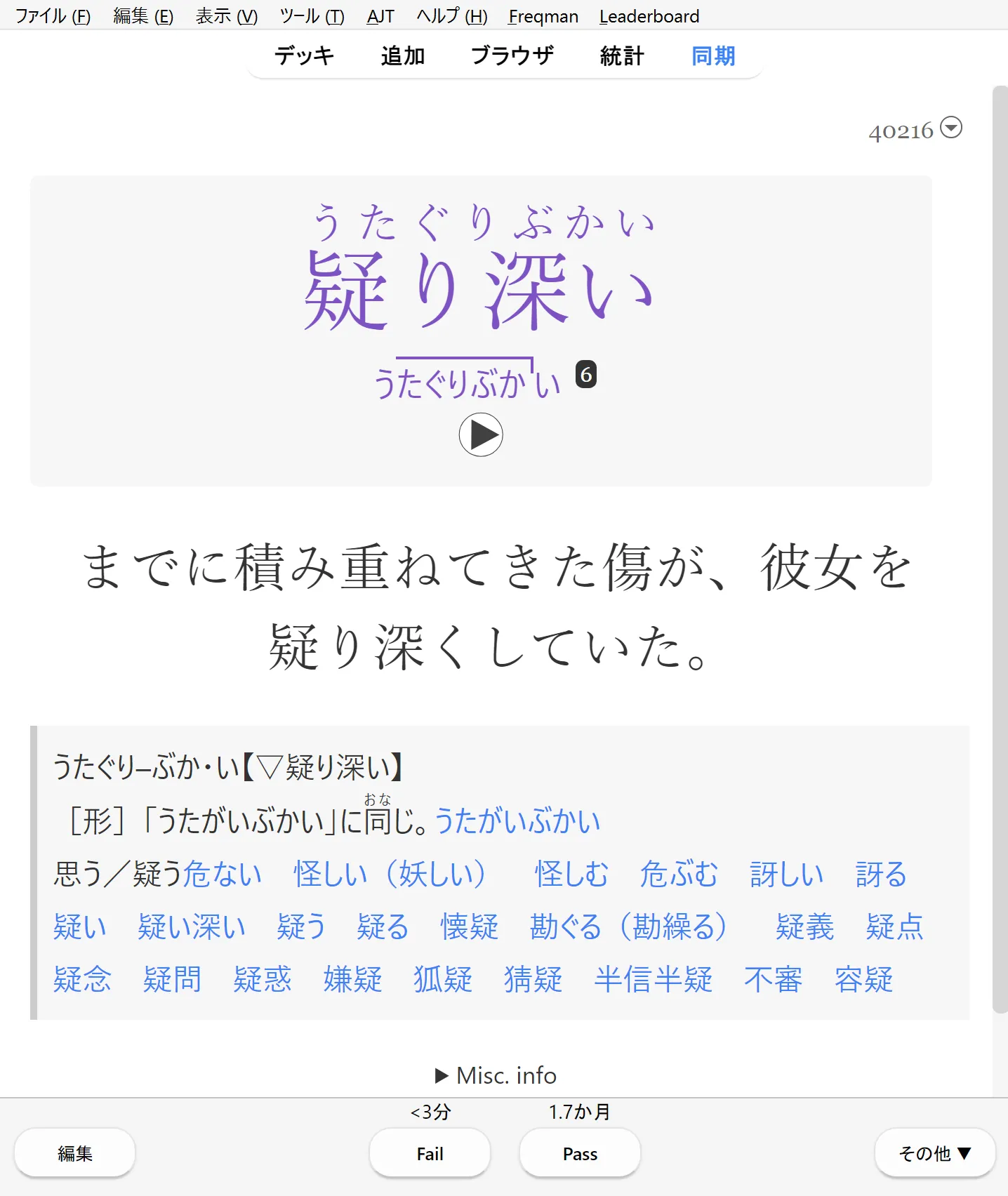
The previous problem is a simple one to fix and really only requires a bit of discipline, but there is another one that isn't really explored as often. How exactly do I even review my cards in the first place? I previously mentioned people leaving Anki for other platforms like Duolingo and WaniKani. Frequent users of Anki may be surprised to hear that this is even a problem for people, but some find doing Anki reviews unbearable because, by default, you are required to evaluate your own performance. Even more than the setup that is required to start using Anki, this single point is probably what filters the most people. I have seen it time and time again in language learning blogs and by language learning YouTubers who have given negative reviews to the application. They either do not feel comfortable evaluating their own performance, or just don't understand how to do it in the first place. After using Anki every single day for years, it's almost become second nature, but after some reflection, I can honestly see how this might be a bit of an issue at first. This is a hard question to answer! I'll say that how you decide to rate your cards is ultimately up to you, and there isn't just one way to do your reviews, but I want to give you some guidelines based on what I consider to be important to help guide you.
Getting the Reading Right
So, let's take an example. Let's say we have a card with 食べる on the front. How do I know I know this word? Or rather, to what degree do I need to know this word to pass it? Well, let's get the easy stuff out of the way first. First, you must get the reading correct. For me, this is non-negotiable. If I do not get the reading correct, I will not pass the card. If you do not get yourself into the habit of ensuring you know the correct reading of words, you are essentially training yourself to not be able to understand words without kanji. You cannot pass 食べる as すべる because you remembered that 食べる means eat. Why? Because what really happened is that you remembered that the character 食 is related to eating and simply evaluated your understanding of the character. But that's a problem: when we are evaluating vocab words, we are not simply evaluating our understanding of kanji. Being able to recognize 食 and recall one of its meanings does no good for us in recalling the meaning of the word たべる as opposed to any other word. Even if you never intend to listen to or speak the language, this is important. Japanese, like any other natural human language, is generally not written with the assumption that you wouldn't know how to pronounce what is written.
Evaluating Meaning
With that out of the way, let's get to the harder part. So, we've gotten past the first barrier: we have looked at the word 食べる, we are able to recognize that its reading is たべる. But we cannot say that we know a word just because we are able to read it. There's nothing stopping you from using Anki as a tool to only remember the readings of words, but for most, I think it is most practical that we, to some degree, make an attempt to remember its meaning as well. Firstly, almost no one would require themselves to be able to recite every dictionary definition verbatim. That's not only an incredibly difficult task but also time consuming, inefficient, and requiring way more than what is necessary to build basic comprehension in reading. What makes evaluating your recollection of meaning tricky is that, unlike readings, you really could ask a hundred people what something means and get a hundred different answers. How close does my answer have to be to the average person (or native speaker in this case) for me to rate a card as being correct?
Well, a good start is being able to visualize the word, especially in the case of nouns. If I can clearly "see" a word, there is a good chance that I will be able to recall it in context. This is the easiest and fastest way to identify a "known" word. Visualization should be your first standard for evaluating your recollection of meaning. If you can "see" a word, you are probably good to pass it. Words that you aren't familiar with will be very hard to visualize. For example, if I see 林檎 and can immediately picture an apple in my mind, that's a pass. If I see the word and my mind goes blank, or I can only vaguely recall "something about fruit maybe?", that's a fail.
Some concepts are harder to tackle. 掛ける has many meanings, with a lot of them being highly abstract. In cases like these, it might be a good idea to at least understand the "base" meanings, usually the first couple of definitions. You don't need to recite all twelve definitions of a word to pass it. If you can recall the core concept, you're fine. The more obscure usages will become clear through repeated exposure in your reading. Context does a lot of heavy lifting here. When you encounter 掛ける in an actual sentence, the surrounding words will usually make it obvious which meaning applies. Anki is just there to give you a foothold. Immersion does the rest.
Here's some practical advice that has worked well for me:
- Don't overthink it. If you hesitate for more than a few seconds trying to decide whether you "really" know a word, you probably don't. A known word should feel automatic. If you're arguing with yourself, just hit Again and move on.
- When in doubt, fail it. It's better to see a card a few extra times than to pass cards you're shaky on. Passing cards you don't actually know just pushes them further into the future where you'll definitely forget them.
- Recognition is enough. You're training recognition, not production. You don't need to be able to use 食べる in a sentence from scratch. You just need to recognize it when you see it. Production comes naturally through immersion and output practice, not through Anki.
- Trust your gut. After a while, you'll develop an intuition for whether you know something or not. That slight feeling of uncertainty? That's your brain telling you the connection isn't strong enough yet. Listen to it.
The goal isn't perfection. You're not trying to build a mental dictionary with pristine definitions. Anki is just there to make sure you don't forget the words you've already encountered. The deeper understanding comes from seeing them over and over again in context while you read.
Quick Lookups During Reviews
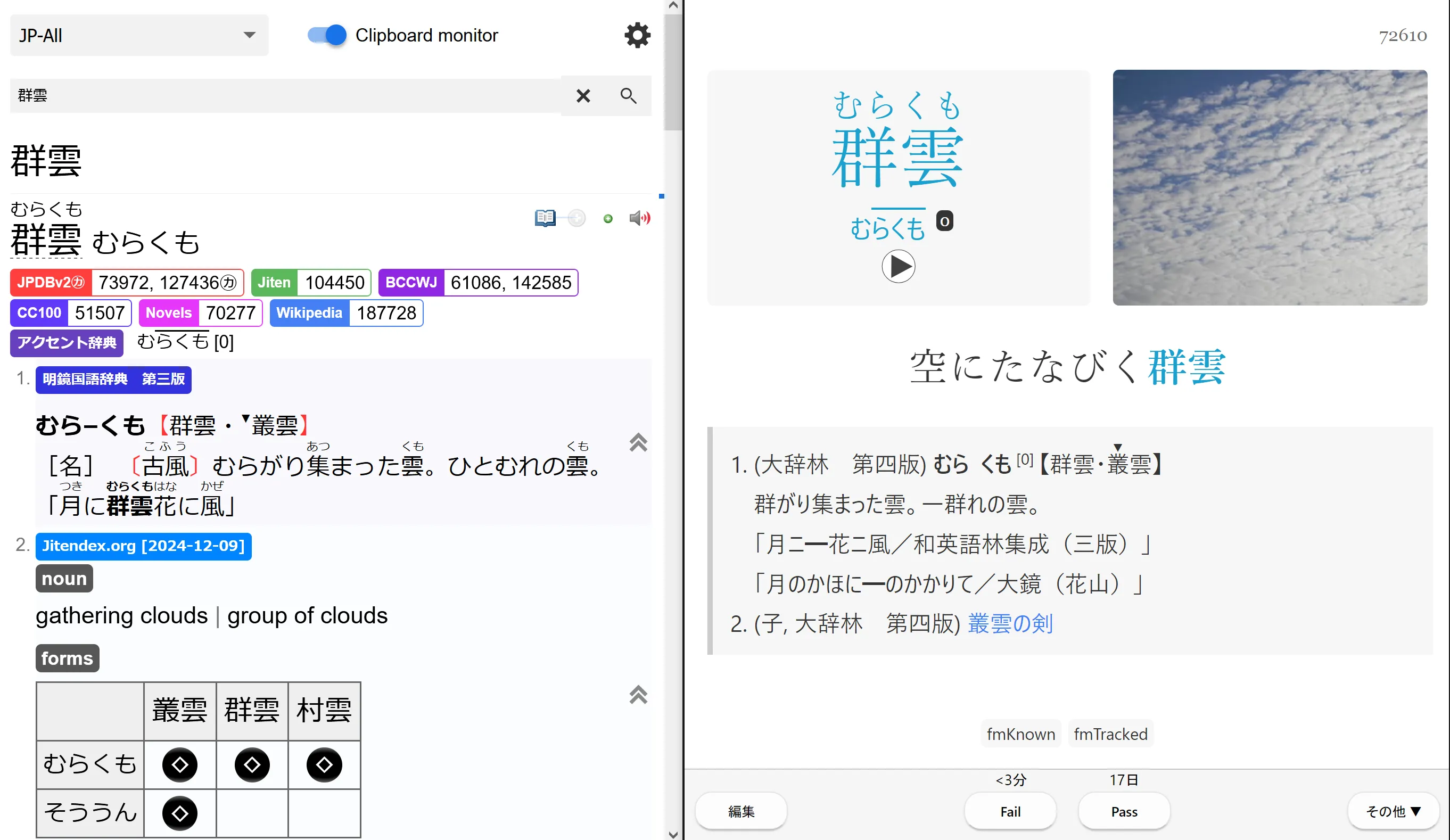
When you fail a card or want to check a definition quickly, you can set up a dictionary to automatically look up whatever Anki copies to your clipboard. With the AJT Autocopy add-on (listed below), Anki will copy the word field when you reveal a card, and your dictionary will instantly show the definition.
If you're using JL, just enable clipboard capture in the settings and it will pick up words automatically. You can also press K during reviews to quickly look up the kanji on a card.

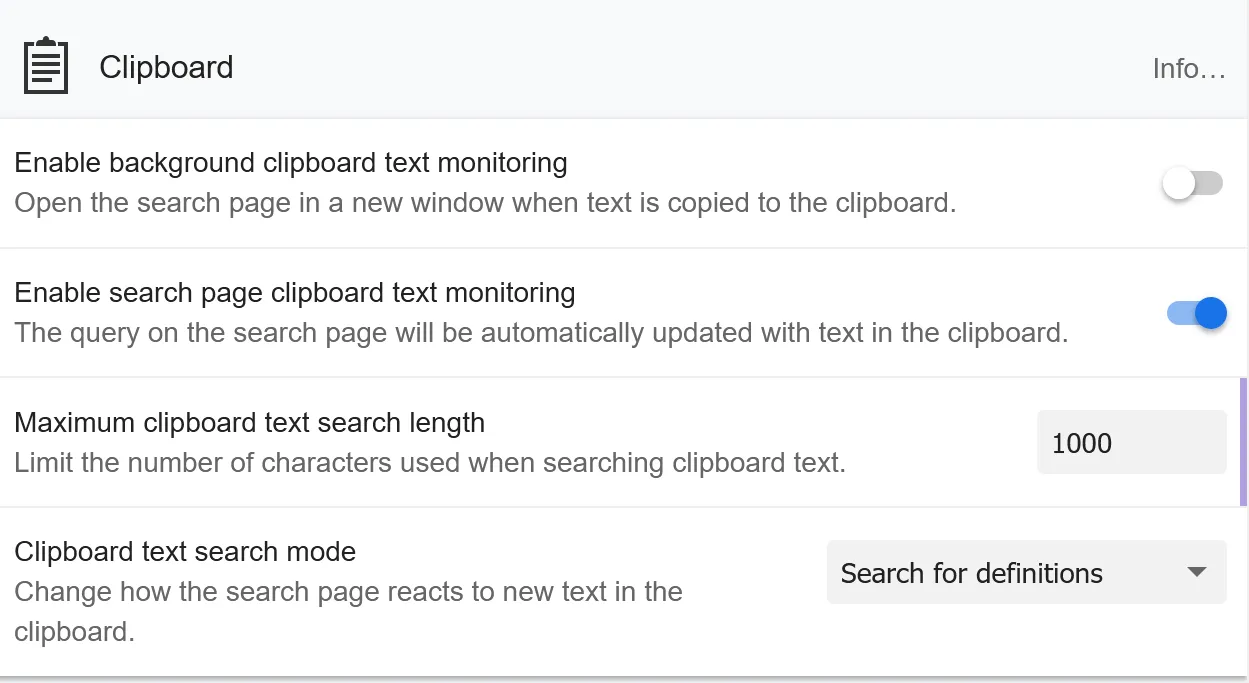
For Yomitan users, open the Yomitan search page in your browser, enable clipboard monitoring in the settings, and set "Clipboard text search mode" to "Search for definitions" so it automatically looks up words:
Add-ons
Add-ons extend Anki's functionality. Install them via Tools → Add-ons → Get Add-ons and enter the code.
Essential Add-ons
| Add-on | Code | Purpose |
|---|---|---|
| AnkiConnect | 2055492159 | Enables Yomitan/JL to create cards automatically |
| FSRS Helper | 759844606 | Postpone, load balance, easy days, disperse siblings |
| Review Heatmap | 1771074083 | Visual motivation - see your streak calendar |
| Local Audio Server for Yomichan | 1045800357 | Serve local audio files for Yomitan lookups |
| PassFail | 876946123 | Remove the Easy and Hard buttons for simpler reviews |
Useful Extras
| Add-on | Code | Purpose |
|---|---|---|
| AJT Japanese | 1344485230 | Adds furigana and pitch accent to cards |
| AJT Autocopy | 1995103628 | Auto-copy fields to clipboard for quick lookups |
| AJT Mortician | 1255924302 | Automatically bury difficult cards until the next day |
| Review Hotmouse | 1928346827 | Use mouse buttons/scroll wheel for reviews |
| Speed Focus Mode | 1046608507 | Auto-alert, auto-reveal, auto-answer for faster reviews |
| Advanced Browser | 874215009 | Better card browser with more features |
| Batch Editing | 291119185 | Edit multiple cards at once in the browser |
| Edit Field During Review | 1020366288 | Fix typos without leaving review mode |
| Kanji Grid | 1610304449 | Visualize your kanji learning progress |
| Kanji Colorizer | 1964372878 | Generate stroke order diagrams for kanji |
| AnkiDraw | 1868980340 | Practice writing kanji by drawing on cards |
| Minimize to Tray | 85158043 | Minimize Anki to system tray instead of taskbar |
| True Retention by Card Maturity | 923360400 | More accurate retention statistics |
Audio Add-ons
| Add-on | Code | Purpose |
|---|---|---|
| AwesomeTTS | 1436550454 | Add text-to-speech audio to your flashcards |
| Forvo Pronunciation Downloader | 858591644 | Download native speaker pronunciations from Forvo |
Image Add-ons
| Add-on | Code | Purpose |
|---|---|---|
| Quick Images Downloader | 8280891 | Bulk download images from Google for your cards |
| Batch Download Pictures | 561924305 | Download pictures from Google Images in batches |
Motivation & Stats
| Add-on | Code | Purpose |
|---|---|---|
| Anki Leaderboard | 175794613 | Compete with friends to boost motivation |
| More Overview Stats | 738807903 | Enhanced statistics on the deck overview screen |
After installing add-ons, restart Anki for them to take effect.
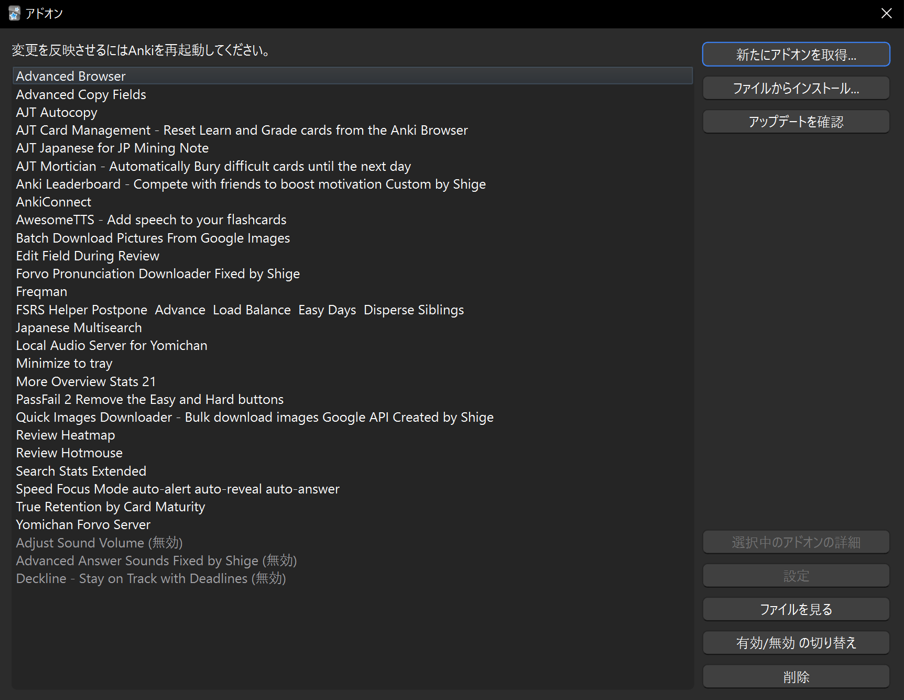
My Add-on List
Integration with Mining Tools
Anki works best when integrated with your reading workflow. The two main dictionary tools that support Anki card creation are:
| Tool | Type | Best For |
|---|---|---|
| JL | Desktop app | VN readers who want a dedicated popup dictionary with native Anki integration |
| Yomitan | Browser extension | Those who prefer browser-based workflows |
Both tools connect to Anki via the AnkiConnect add-on (listed above). For Yomitan setup, see Donkuri's comprehensive guide.
Troubleshooting & Tips
Reviews piling up?
- Set new cards to 0 until you catch up
- Do reviews first thing in the morning
- Consider if you're adding too many new cards
Cards feel too easy/hard?
- Make sure FSRS is enabled
- Let the algorithm adjust over time
- Grade honestly, don't overthink
Sync issues?
- Always sync before closing Anki
- Check your AnkiWeb account is connected
- Force a one-way sync if needed (Tools → Preferences → Network)
Card design tips:
- Keep cards simple: Japanese word on front, reading + meaning on back
- Don't over-engineer with audio, images, multiple fields, etc. unless it genuinely helps you
- Complex cards take longer to review and often aren't worth the extra effort
Mining tips:
- Only add words you've seen in context (from VNs, anime, etc.)
- The "75% test": if a word feels 75% graspable when you look it up, it's a good candidate. If it's completely foreign or extremely obscure, skip it
- Quality over quantity
Join Our Leaderboard
We have a group on the Anki Leaderboard addon where you can see how your reviews, study time, and streak stack up against other VN readers. It's a fun way to stay accountable.
How to join:
- Install the Anki Leaderboard Addon
- Open Anki, go to the leaderboard, and search for the group VNCR
- Enter the password: gskt